Workout tracker app: log every session and see your progress
By Raúl MedinaUpdated 7 min read

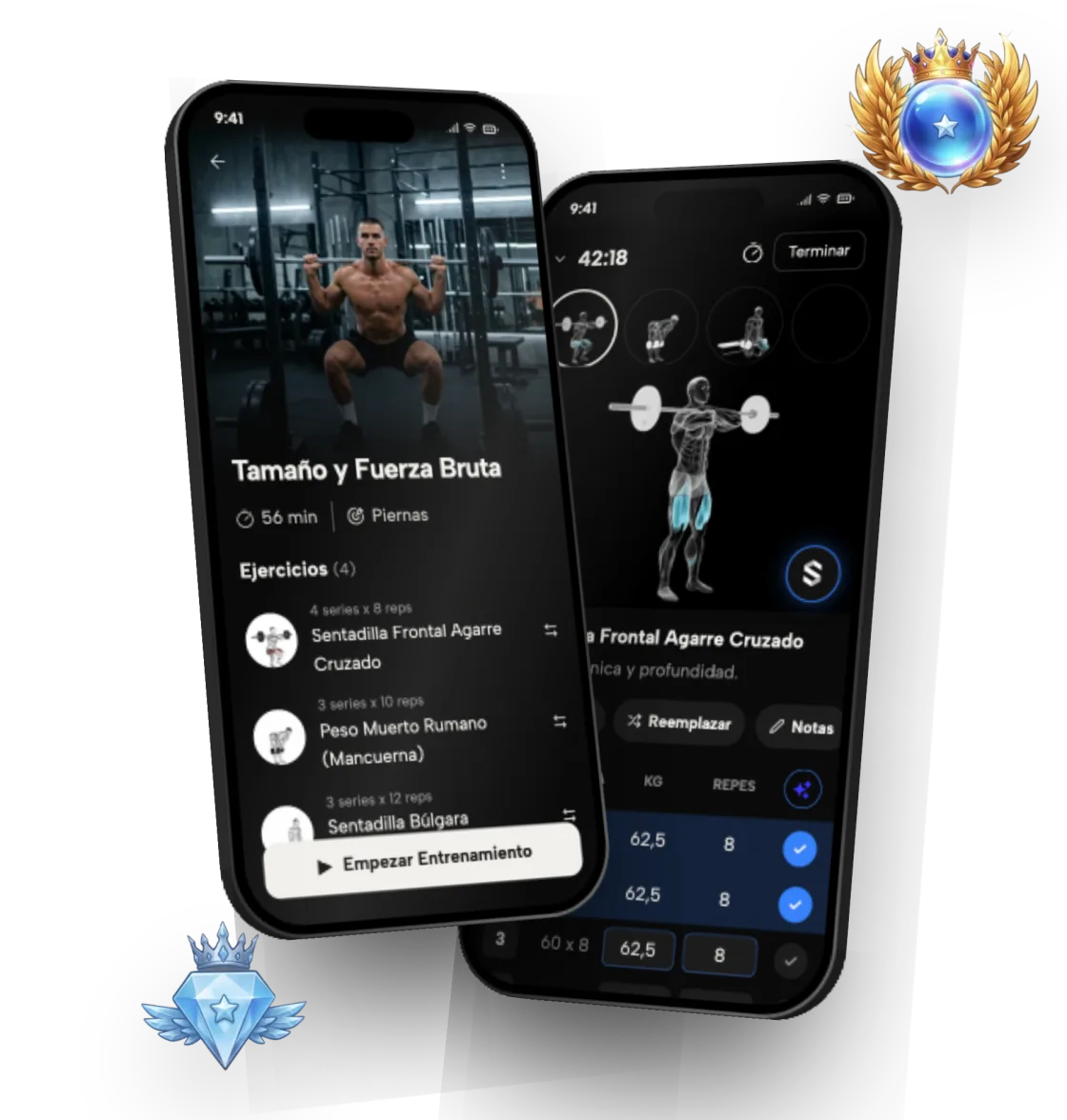
A workout tracker app records every set you do (exercise, weight, reps and effort) so you can compare sessions and see whether you're progressing. Without a log, progressive overload is guesswork. Symmetry logs a session in seconds and turns it into strength charts, weekly sets per muscle, personal records and ranks.
This guide covers what is worth logging, how to get started step by step, how to read your progress, and what the app does with all of it.
Table of contents
- 1Why track your workouts?
- 2What should you log in every session?
- 3How do you start tracking your workouts?
- 4What can you see in the app?
- 5How do you know if you're making progress at the gym?
- 6What are ranks and how do they measure your level?
- 7How does Symmetry use your history for the next session?
- 8Does it sync with Apple Health or Health Connect?
- 9Notebook, spreadsheet or workout tracker app?
- 10What mistakes should you avoid when logging workouts?
- 11What Symmetry tracks
Why track your workouts?
Because memory is unreliable. Without a log it's easy to lose count of how much you lifted or how many sets you did. And without that information you can't apply progressive overload properly: doing a little more than last time.
A log also protects you from the two most common mistakes: repeating the same workout for months without noticing you have plateaued, and adding weight too fast. With the numbers in front of you, every session has a concrete target. You know what weight you used last time and how many reps you got, so today's goal is to match it or beat it by a little. And when you stop improving, the log tells you since when and on which lifts, instead of leaving you with a vague feeling that you're stuck.
What should you log in every session?
The useful minimum is small, and the app sets most of it up for you:
- The exercise, so you always compare like with like.
- Weight and reps for every set, not just your best one.
- Effort: RPE for each set, so you know whether you had reps left or went all out.
- Date and duration, to see how consistent you are.
- Optional: bodyweight, measurements and progress photos, if your goal is changing your physique.
How do you start tracking your workouts?
These steps work whether you're starting from scratch or switching from a notebook or another app:
- 1. Download Symmetry (free on iPhone and Android) and build your routine around your schedule, level and equipment.
- 2. If you were logging in Hevy, Strong or Liftoff, import your history so you keep your numbers.
- 3. During each session, log the weight and reps of every set as you finish it.
- 4. Add RPE when you want to measure effort more precisely.
- 5. Once a week, review your sets per muscle and your strength charts.
- 6. Every few weeks, check your ranks and, if you like, your measurements and photos.
What can you see in the app?
Your log doesn't stay a list of numbers. The app organizes it so you can see whether you're progressing, and where.
- How your strength has moved on each exercise over time
- Effective sets per muscle group each week
- Streaks that reward consistency
- Personal records (PRs), detected automatically
- Body measurements and progress photos, with side-by-side photo comparison
How do you know if you're making progress at the gym?
The clearest sign is that, with good form, you move more weight or do more reps on the same exercise than a few weeks ago. If a lift hasn't moved in four to six weeks, it's worth reviewing your volume, rest or technique. Keep in mind progress isn't linear: some weeks will be worse because of sleep, stress or food. Look at the trend over several weeks, not a single session. PRs help here: every time the app detects a new best, you have concrete proof you're moving forward.
Look at volume per muscle too. As a general guideline, 10 to 20 hard sets per muscle group per week is a common range for building muscle. If one muscle group sits well below that, it is probably the one lagging behind.
What are ranks and how do they measure your level?
On top of the charts, Symmetry gives you a rank for each exercise, each muscle, each muscle group and overall, calculated relative to your bodyweight. There are 9 ranks: Iron, Bronze, Silver, Gold, Ruby, Emerald, Diamond, Champion and Symmetric.
From Iron to Champion, each rank has three divisions: I, II and III. Symmetric is the top rank, for the top 1%, and has no divisions. Ranks are relative: each one corresponds to a percentile band within a community cohort for that exercise, with bodyweight-adjusted scoring, so a lighter lifter and a heavier lifter are compared fairly. It's a simple way to see where you stand, which muscle is lagging and what you need to move up. Because your muscle rank draws on every exercise that trains it, it also flags imbalances: if your chest is Gold and your back is Bronze, you know where to add volume.
How does Symmetry use your history for the next session?
Logging a set takes seconds, and your history doesn't just sit there. With Symmetry Pro, progressive overload is automatic: the app uses what you did in previous sessions to work out how much weight or how many reps to do next.
On the free plan you get a personalized routine, up to 4 routines, workout logging and ranks, with no ads. If you have questions about your progress, the Symmetry Intelligence chat can answer questions about your training. It is the same history that powers your charts and ranks, so the more consistently you log, the more useful every one of those tools becomes.
Does it sync with Apple Health or Health Connect?
Yes. Symmetry syncs with Apple Health on iPhone and Health Connect on Android, so your workouts sit alongside the rest of your health data and you never log anything twice. That way your training shows up next to your steps, sleep and other health metrics in the apps you already use. If you also want to see physical change, you can log body measurements and progress photos, and Symmetry includes an AI body scan to follow your progress from your phone.
Notebook, spreadsheet or workout tracker app?
All three work if you use them every time. A notebook is fast and never runs out of battery, but it doesn't calculate anything: to see whether you're progressing you have to flip pages and compare by hand. A spreadsheet gives you charts, but filling it in between sets is clunky and few people keep it up for more than a few weeks.
A workout tracker app combines the best of both: logging is as fast as paper, and the charts, PRs and sets per muscle appear on their own. There is no formula to maintain and nothing to copy over at the end of the week. In Symmetry your routine is already loaded, so for each set you just confirm the weight and reps you did.
What mistakes should you avoid when logging workouts?
A log is only useful if you can trust it. These are the most common slip-ups:
- Logging only your best set: you lose the real volume you did.
- Switching exercises every week: there's nothing to compare, so progress stays invisible.
- Counting reps done with bad form: they inflate the numbers and mislead your progression.
- Skipping effort: two sessions at the same weight are not the same if one was all-out and the other was easy.
- Logging from memory after the workout: record each set as soon as you finish it.
What Symmetry tracks
- 01
Strength trend
How your weights have gone up on each exercise.
- 02
Volume per muscle group
How many effective sets you do for each muscle every week.
- 03
Streaks and consistency
A streak system that helps you keep the habit.
- 04
Personal records
The app spots your best lifts so you can celebrate every step forward.