Custom workout plan: how to build one that fits you
By Raúl MedinaUpdated 6 min read

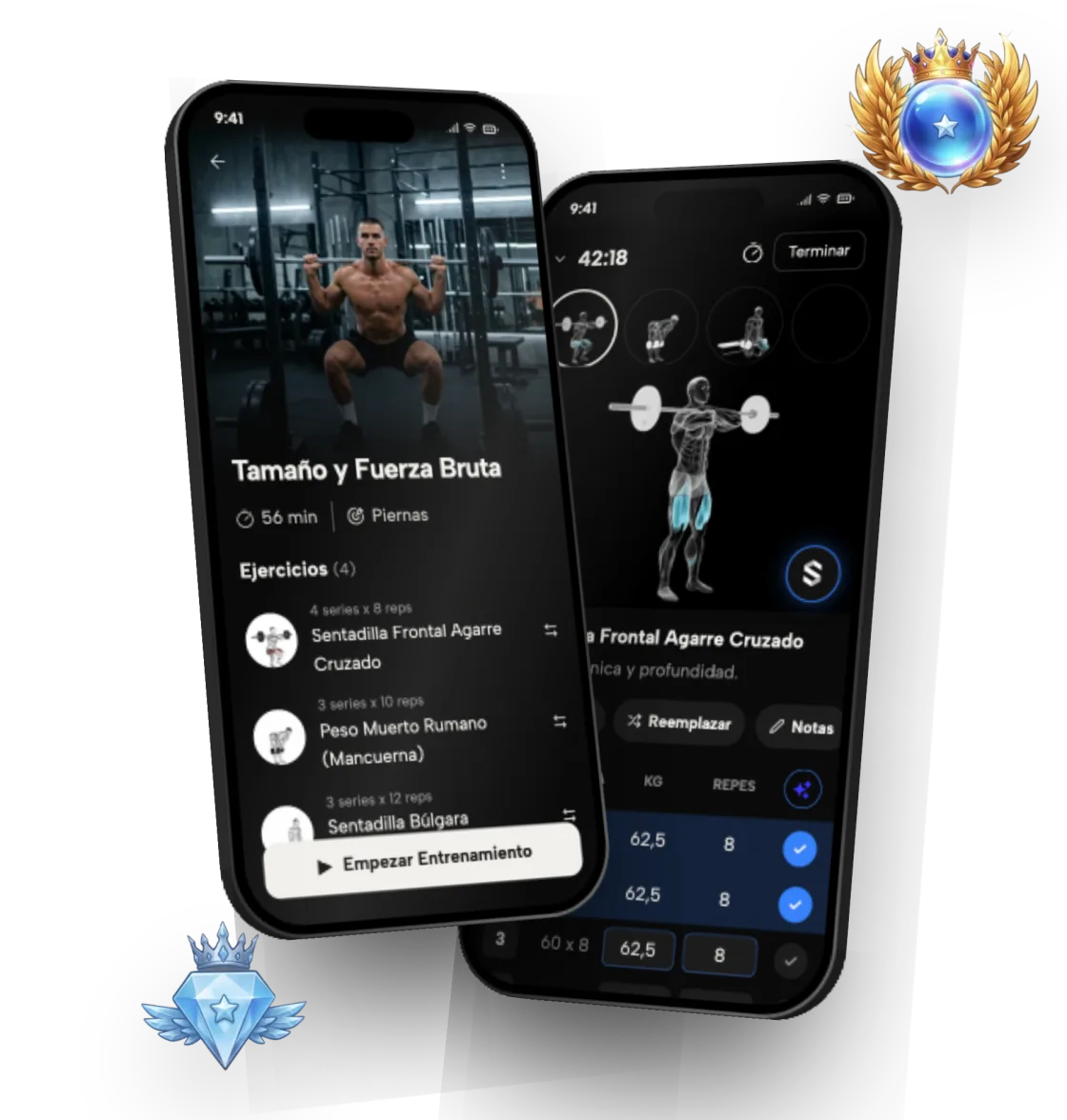
A custom workout plan starts from your experience, your goal, the days you can train and your equipment, then picks exercises, sets and reps from there. You can build one by hand with a few simple steps, or let Symmetry generate it for free in under a minute.
This guide covers the rules for doing it yourself and how the app handles it, including the ranks that show which muscles are lagging.
Table of contents
- 1What is a custom workout plan?
- 2How do you build a custom workout plan, step by step?
- 3Which split fits the days you train?
- 4How many sets and reps should your plan have?
- 5How does Symmetry build your custom workout plan?
- 6How do you know your plan is working?
- 7Does a custom workout plan work at home?
- 8What every plan includes
What is a custom workout plan?
A custom workout plan is a training program designed for one specific person, not an average user. It accounts for how long you've been training, what you want to achieve, how many days you can get to the gym and what equipment you have. It also considers how much time you can give each session and which exercises feel comfortable for you.
A generic template doesn't know whether you've been training for two weeks or five years, or whether you have three free days or five. The result is usually too much volume when you're starting out, or too little to keep progressing later on.
Customizing doesn't mean reinventing. The principles that make any plan work are the same for everyone: enough volume, sets close to failure, gradual progression and recovery. What changes is the dose: how many days, how many sets, which exercises your gym allows and how long each session can be.
How do you build a custom workout plan, step by step?
Building your own plan comes down to six decisions, in this order:
- 1. Pick one main goal: build muscle, get stronger or lose fat while keeping muscle.
- 2. Choose how many days a week you can realistically train, not ideally.
- 3. Pick a split that fits those days (full body, upper/lower or push/pull/legs).
- 4. Anchor each session on one or two compound lifts: squat, deadlift, bench or overhead press, rows or pull-ups.
- 5. Add isolation exercises until each muscle reaches the weekly volume you want.
- 6. Log every session and add weight or reps once you hit the plan with good form.
Which split fits the days you train?
Your split depends mostly on the days you have. With three days, training the whole body every session usually makes sense. With four, alternating upper and lower body works well. With five, spreading muscle groups further gives each one more volume without cutting into recovery. If you're torn between two options, pick the one you can stick with for months, not the one that looks most complete on paper.
No split is magic. What matters most is hitting each muscle with enough volume, ideally at least twice a week, and staying consistent.
Session length counts too. If you only have 45 minutes, a few well-performed exercises beat trying to cram everything in. And if you miss a day, you don't need to rebuild the week: just pick the plan up where you left off.
- 3 days: full body every session
- 4 days: upper and lower, twice each
- 5 days: a mix of upper/lower and push/pull/legs
How many sets and reps should your plan have?
A common guideline for building muscle is 10 to 20 hard sets per muscle group per week. If you're new, start near the low end and build up over time. Spreading those sets across two or more sessions a week usually works better than cramming them into one day, because each session starts with a fresher muscle.
Reps leave plenty of room: anywhere from about 6 to 30 can build muscle when sets end close to failure. For strength, main lifts usually sit in lower rep ranges with longer rest.
Close to failure means finishing a set with one to three reps in reserve. That's why logging RPE helps, and Symmetry lets you record it on every set since version 7.16: over time you'll see whether your sets are too easy to drive progress.
- Build muscle: more volume per muscle group, with progression in reps and weight
- Build strength: priority on compound lifts and on progressing the load
- Lose fat: hold on to your strength and muscle while you take care of your diet
How does Symmetry build your custom workout plan?
You start by answering a few questions: how long you've been training, what you want to achieve, how many days a week you can train and what equipment you have. From that, the app generates a complete plan with the exercises, the order, the sets and the reps.
The custom plan is part of the free tier, which lets you keep up to 4 routines. You can edit it, swap exercises or build your own routines from scratch. With Symmetry Pro, the app also adjusts weights and reps automatically from what you log: progressive overload. That way you can start from the generated plan and shape it to your taste without losing the underlying structure.
If you have questions about your plan, you can ask Symmetry Intelligence, the in-app chat. If you're coming from Hevy, Strong or Liftoff, you can import your history.
How do you know your plan is working?
Your plan is working if, week to week, you lift a bit more weight or squeeze out another rep with the same form. If you've gone several weeks without improving on a lift, it's time to look at volume, rest or recovery.
Change exercises only when there's a reason: discomfort, missing equipment or a long plateau. If you swap everything every few weeks, you lose the reference point for knowing whether you're improving. A small tweak, like adding a set or switching a variation, is usually enough.
In Symmetry, every workout becomes ranks per exercise, per muscle and overall: nine ranks, from Iron to Symmetric, the top 1%. If your leg rank is far behind your chest rank, you know which part of the plan to strengthen. Your rank never drops for taking a break.
Does a custom workout plan work at home?
Yes. When you create it you tell the app what equipment you have, and it picks bodyweight, dumbbell or resistance band exercises if you don't have a full gym. The principles stay the same: enough volume, close to failure, and progression. With little equipment, progression can come from more reps, pauses, slower tempo or harder variations of the same exercise.
It works whether you're a complete beginner or an intermediate lifter. If you have an injury or a medical condition, check with a professional before you start. The first months bring the fastest progress, so it pays to start with a clear plan from day one.
What every plan includes
- 01
Exercises picked for your goal
Build muscle, lose fat or get stronger: the exercise selection reflects what you're after.
- 02
A weekly schedule that fits
The plan is organized around the days you can really train.
- 03
Ranks per muscle
Nine ranks, from Iron to Symmetric, show which muscles are ahead and which need more work.
- 04
Automatic progression with Pro
Symmetry Pro adjusts weights and reps from every session you log.