Gym workout app: how to pick one and get the most from it
By Raúl MedinaUpdated 7 min read
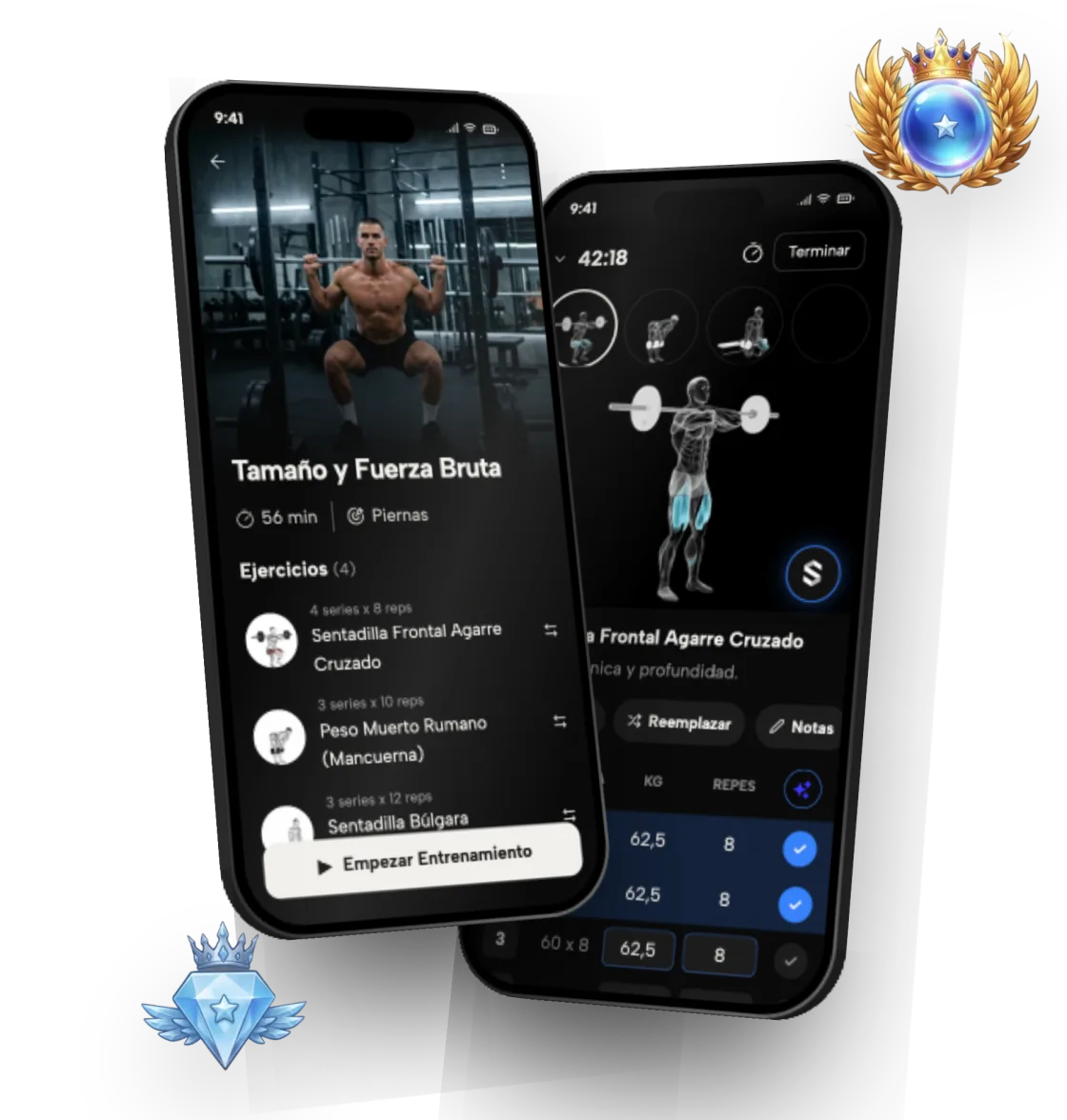
A good gym workout app tells you what to train each day, logs every set in seconds and shows whether you are progressing. Symmetry does that for free on iOS and Android: it builds your custom plan, saves your workouts and turns your lifts into ranks per exercise, per muscle and overall.
More than 3 million downloads (as of September 2026) and a 4.8 rating on the App Store and Google Play (as of November 2026). The download is free, and building your plan takes less than a minute.
Table of contents
- 1What should a good gym workout app do?
- 2What kinds of gym apps are there?
- 3How do you start using a gym app, step by step?
- 4How does Symmetry work at the gym?
- 5What are Symmetry ranks?
- 6How many sets and reps should you log?
- 7Is it for beginners or experienced lifters?
- 8Is Symmetry free, and what does Pro add?
- 9What makes Symmetry different
What should a good gym workout app do?
A good gym app answers three questions: what to train today, how much weight and how many reps to do, and how you compare with last week. If it only handles one of them, you end up patching the rest with notes, spreadsheets or memory.
Walking into the gym without a plan is the fastest way to stall. You repeat the same exercises, you never know whether today is the day to add weight, and a few weeks later you stop seeing changes. The app should settle that before your first set.
It also has to be fast between sets. If logging a set takes longer than your rest, you'll stop doing it, and without a log there's no way to know whether you're progressing. Look for one that keeps your full history and lets you import or export it: your numbers from a year ago are the best reference for how far you've come.
What kinds of gym apps are there?
There are three broad kinds. Pure workout loggers let you record what you do, but the plan is up to you. Workout planner apps give you a program, sometimes fixed and sometimes adaptive. Class and video apps coach you through each session but rarely track your weights.
Symmetry combines the first two: it generates a custom plan and is also a full log of sets, reps and weights. If you already follow your own program, you can build routines by hand instead of using the generated one.
To choose, think about how you train today. If you walk into the gym unsure what to do, you need an app that gives you the plan. If you know what to do but lose track of your weights, a good logger is enough. And if you switch programs every few weeks, you want one that does both and keeps your whole history in one place.
How do you start using a gym app, step by step?
Getting set up takes a few minutes on day one, then it becomes automatic. Here is how it works in Symmetry:
- 1. Download the app from the App Store or Google Play and create your account.
- 2. Answer the starting questions: experience, goal, days per week and the equipment you have.
- 3. Review the plan the app builds: exercises, order, sets and reps.
- 4. At the gym, open today's workout and log each set as you finish it: weight, reps and, if you like, RPE.
- 5. Check the technique tutorial on any exercise you're unsure about.
- 6. At the end of the week, look at your charts and ranks to see what improved.
How does Symmetry work at the gym?
When you open the app you see today's workout: the exercises, sets and reps. You log each set as you finish it, and the app saves the session with its volume, personal records and streak.
With Symmetry Pro, the app uses that history to work out the next session. If you hit everything that was planned, it suggests adding weight or reps; if you didn't, it keeps the load where it is. That is progressive overload, gradually increasing the challenge, the principle behind almost all progress in strength and muscle.
Since version 7.16 you can log RPE on every set, meaning how close to failure you finished it. And if you are coming from Hevy, Strong or Liftoff, you can import your history so you don't start from zero.
- A plan matched to your level, your goals and your equipment
- Fast logging of sets, reps, weight and RPE
- Step-by-step technique tutorials for every exercise
- Charts for strength, volume and consistency
- Sync with Apple Health and Health Connect
What are Symmetry ranks?
Ranks are how Symmetry turns your lifts into a level you can compare. Every workout you log becomes a rank per exercise, per muscle group and overall: nine ranks, from Iron to Symmetric, the top 1%. It's a quick answer to the question every lifter asks: am I strong for how long I've been training?
They account for your bodyweight and are measured against the community doing that same exercise, so you see where you stand against people who train the same lift. Your rank never drops for taking a break.
Ranks are part of the free plan, and they're practical: if your chest rank is far ahead of your back rank, you know where to put more work. With challenges you can also go head to head with friends.
How many sets and reps should you log?
For building muscle, a common guideline is 10 to 20 hard sets per muscle group per week. Rep ranges matter less than people think: anywhere from about 6 to 30 reps can build muscle when sets end close to failure.
If you are new, stay at the low end of those ranges and focus on technique. A gym app helps here because it adds up your volume per muscle and shows whether you are doing too little or too much.
What you should avoid is changing your routine every week. Progress comes from repeating the same lifts long enough to get better at them, and you only see that if every set is logged. One to three minutes of rest between sets is usually enough; heavy compound lifts benefit from the longer end.
Is it for beginners or experienced lifters?
Both. If you are starting from zero, Symmetry gives you a plan built from exercises you can perform correctly from day one, and it teaches the technique for each. Some exercises include video from several angles.
If you have been training for a while, the app takes over the bookkeeping: it tracks weekly volume per muscle group, keeps your records and lets you build your own routines. If you have questions about your plan, you can ask Symmetry Intelligence, the in-app chat. You can mix the generated plan with your own routines, for example an extra arm day or a short session for when you're in a hurry.
Is Symmetry free, and what does Pro add?
Symmetry is a free download on the App Store and Google Play. The free plan includes workout logging, a custom plan, up to 4 routines and ranks, with no ads.
Symmetry Pro is an optional subscription that adds automatic progressive overload, among other things. It costs €12.99/month or €39.99/year on the Spanish App Store (as of October 2026).
What makes Symmetry different
- 01
Ranks per exercise and muscle
Nine ranks, from Iron to Symmetric, show your level on every lift, every muscle and overall.
- 02
Automatic progressive overload
With Pro, it works out how much to lift each session from how you performed last time.
- 03
Progress stats
Clear charts of strength, volume and consistency, so you can see how you are really progressing.
- 04
Proper technique
Step-by-step instructions on every exercise, so you train with good form.